
Installation Instructions
INSTALLING SILICON TRAVEL EQUIPMENT
Here are the steps for a seamless installation and providing fast reliable Internet/WiFi and Streaming for your guests.
Best practice is to let Silicon Travel know that you’ll be installing new router(s) prior to arrival at the property. Email or text Mike or the team and everything will be setup and ready.
Mike Harvey: (301) 616-1395; mike@vacationsurfing.com
Silicon Travel Support: (800) 459-2256; support@silicontravel.com

Router Installation:
- Disconnect and power off all existing hardware before making any changes. If you are replacing an old router, disconnect its power adapter and all cables.
- Connect the modem. Connect the modem’s power adapter and plug it into a power outlet. Wait for the modem to fully boot up. The indicator lights should turn solid.
- Connect the router to the modem. Plug one end of an Ethernet cable into the modem’s LAN port. Plug the other end into the router’s internet (WAN) port, which is often a different color from the other ports.
- Power on the router. Connect the router’s power adapter and plug it into a power outlet. Wait a few minutes for the router to boot up.
- If the network name (SSID) has not been changed, all equipment will be connected and whitelisted. If you have not previously contacted Mike or support, please contact us now and let us know that you have completed setup and provide the Modem MAC address and equipment location. This information helps our support team to better support your guests and owners if they have any problems.
- Check the TVs to be sure they have the Spectrum Streaming App.
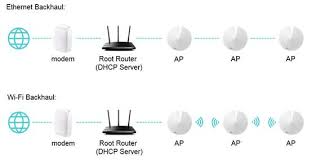
Deco MESH Installation:
- Connect the Deco (labeled “Main”) Ethernet port to one of the routers LAN ports using Cat 5 cable provided.
- Power up Main Deco.
- Once LED light is green (this could take a couple of minutes), plug in the other Decos within WiFi range of the main deco or within range of each other to provide optimal WiFi coverage.
- Ensure all lights on the Decos are green and connect to the WiFi network to test.